
01
Every bill, checked
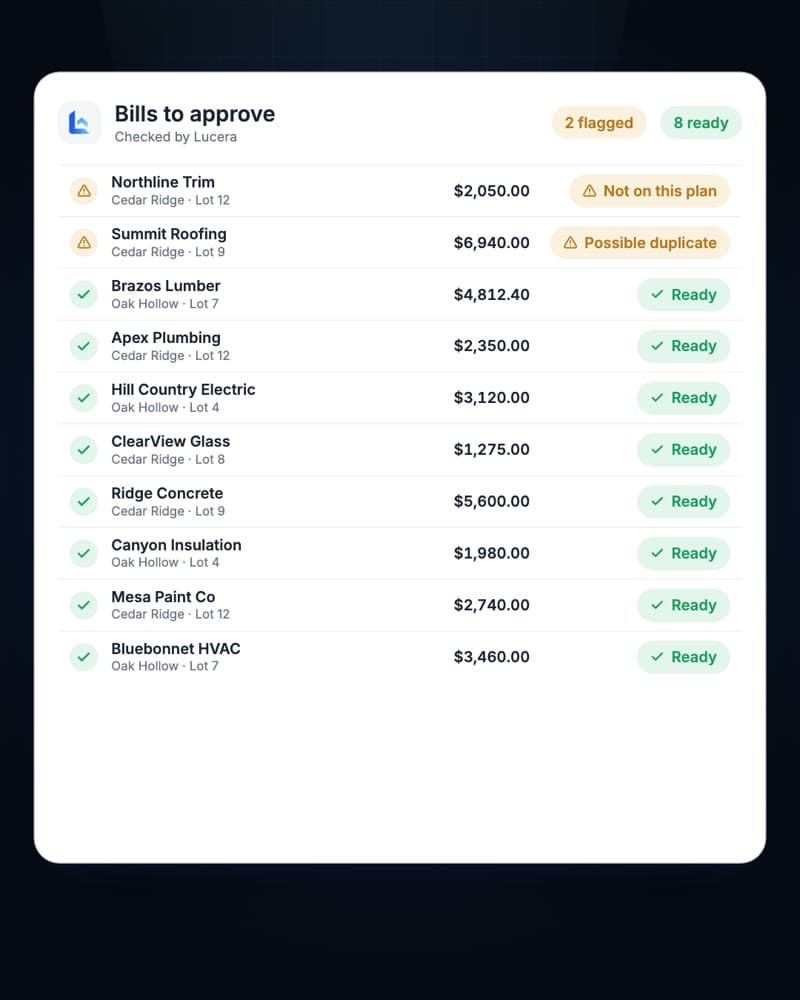
Invoices keep arriving in your billing inbox. Lucera reads each one, codes every line to the right home, and sorts what’s ready from what isn’t.
AI bill processing for home builders
POs are estimates, so every bill shows a variance. Lucera compares each line with what you paid on similar homes, catches the items and services that don’t belong, and gets them fixed with the vendor. You just approve.
Illustrative example. Vendor, invoice, homes, and costs are fictional.
How it works
01
Invoices keep arriving in your billing inbox. Lucera reads each one, codes every line to the right home, and sorts what’s ready from what isn’t.
02
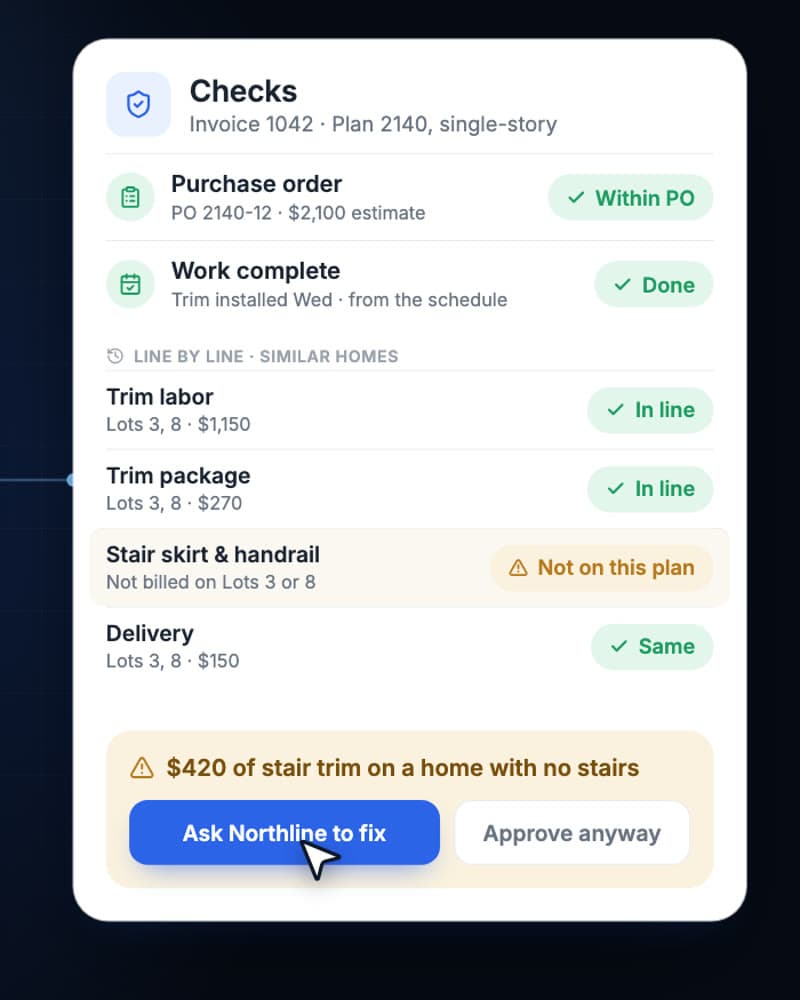
A bill can land within the PO and still be wrong. Lucera compares every line with similar homes and flags extra items, services, and quantities.
03
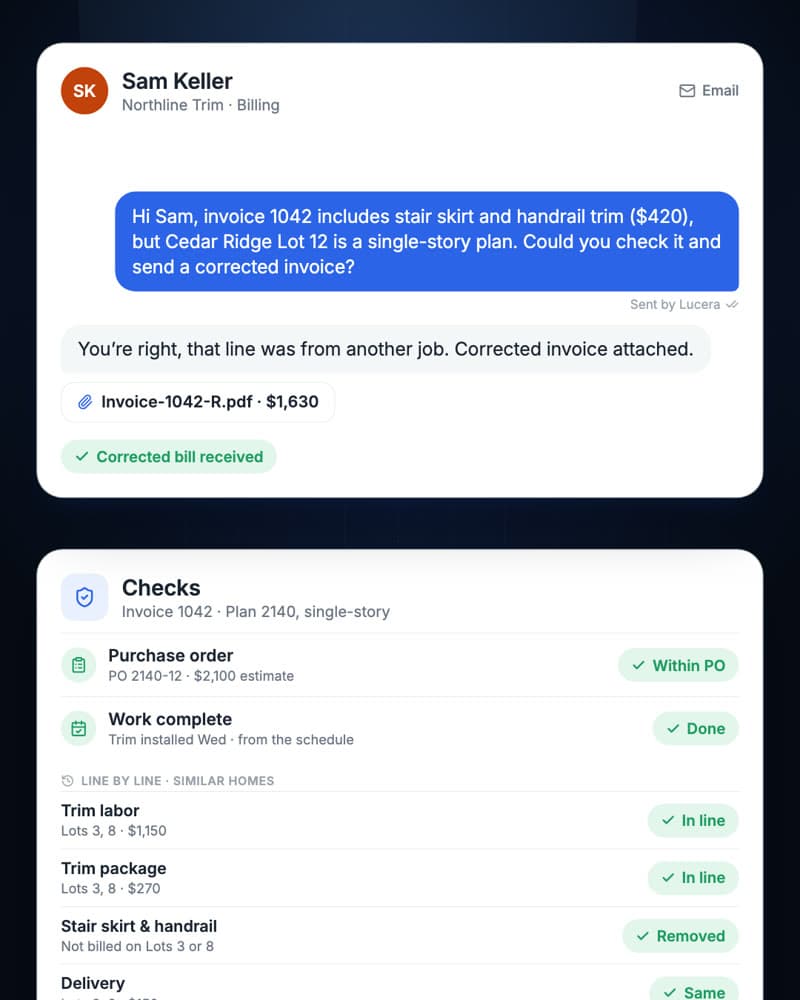
Tap once and Lucera emails the vendor, explains what looks wrong, and checks the corrected bill when it comes back.
What it checks
Every line compared with what the same plan and trade cost on homes you’ve already built.
Add-ons, return trips, and materials that weren’t billed on similar homes, or don’t fit this plan.
Whether the work was actually done, from the schedule and the vendor’s own updates.
Compared too, with the understanding that estimates rarely match the bill to the dollar.
Every line pulled from the PDF and coded to the right home, with uncertain matches marked.
Bills sent twice and totals that don’t add up, caught before anyone pays.
Your team stays in control
A flag comes with the reason and the source records, so you can fix it, approve it anyway, or ask a question in seconds.
Lucera prepares every bill. Approval and payment authority stay with you.
Ask it to follow up and it handles the back-and-forth, on the record.
The original invoice, the PO, and every email stay attached to the bill.
Getting started
Works with the superintendent agent
If your superintendents use Lucera too, bills can be checked against the schedule and what the trade reported, so a bill for unfinished work gets flagged instead of paid.
A few practical questions
Lucera reads the invoices that arrive in your billing inbox, extracts line items, suggests home and cost-code matches, and checks each bill against your purchase orders, budgets, and similar homes. It flags what looks wrong, follows up with the vendor when you ask, and leaves approval to your team.
Bring examples of the PDFs, document attachments, and invoice images that arrive in your billing mailbox. During onboarding, we agree on supported formats and how missing, unreadable, or ambiguous information reaches a reviewer.
We set up the workflow around your homes, vendors, cost-code structure, and available records. Comparisons need a relevant plan, trade, scope, and price basis. A difference is a reason to review the details; it does not by itself establish an overcharge.
Yes, where those records are provided and included in your pilot scope. Because POs and budgets are estimates, most bills show some variance against them. Lucera also compares each line with similar homes you’ve built, which is where extra items, services, and quantities stand out.
It flags the bill with the reason, such as an item that wasn’t billed on similar homes or a possible duplicate. You choose what happens next. If you ask Lucera to follow up, it emails or texts the vendor through the channel agreed during onboarding, explains the difference, and checks the corrected bill when it arrives. Nothing goes to a vendor unless you ask.
Where your superintendents use Lucera’s superintendent agent, a bill can be checked against the schedule and trade conversations for that home. Without that connection, the bill is checked against the records included in your pilot.
No. Bill processing is a standalone pilot. If you also pilot the superintendent agent, we can scope a connection to relevant field conversations and schedule records. That connection is additional setup, not a requirement for the billing pilot.
No. The billing pilot prepares information for your reviewer. Your team retains approval and payment authority. Accounting writeback, integrations, and any additional automation are agreed separately.
Read more
A practical invoice workflow for residential builders: collect originals, match homes and cost codes, compare past builds, and review exceptions. Includes a worked example.
A practical guide to AI agents for home builders: superintendent coordination, invoice processing, pre-construction, and warranty. Worked examples and review checklists.
Let’s talk about your homes
Send us a few sample invoices and your cost codes. We’ll walk through Lucera on your bills and agree on a practical first pilot, including scope, pricing, and a start date.